
Digital Wax-Ups

The restorative blueprint, designed before the dentist preps — preview form and occlusion digitally, then export it to a mockup, matrix or final restoration.

A digital wax-up is where the restorative plan takes shape. Proposed form, length, proportion and occlusion are designed in CAD, so the case is decided before a bur touches enamel.

Jahn De Khudikine, Founder · Universal Dental Lab
Jahn De Khudikine Founder · Universal Dental Lab

Why send it here

You set the goal. We design to it — before the prep.

A practice's schedule lives or dies by the lab — I've watched one late case push back a whole day of chair time.

So I still know the cases moving through this lab, and I answer for how each one is made. Send a case here and it doesn't drop into a queue — it lands with me and one technician who carries it start to finish.

Start a case
Before the prep
Form and occlusion decided digitally, not at the bur iTero · 3Shape · Medit
One file forward
The approved wax-up drives mockup, provisional, and final The same design from plan to seating
Your technician
One person holds your case Reach them directly — no call-center queue
Free scanner
3Shape TRIOS 6 for partners Go fully digital at no cost

Digital Workflow

From Scan to Restorative Blueprint

Four steps, with your approval before the wax-up drives the rest of the case.

  1. Send the Case

    Upload an STL of both arches with a bite, plus photographs for esthetic cases. Note the changes you want — length, form, midline, vertical dimension.

  2. Design the Wax-Up

    Technicians design the proposed restorations digitally against the occlusion and, for anterior work, the facial reference and any smile design.

  3. Review & Refine

    You receive the wax-up to approve or adjust. We flag clearance or occlusal issues the plan reveals before anything moves forward.

  4. Export to Production

    On approval the wax-up exports to a printed model, a matrix, a mockup or the final restorative design — the blueprint for the rest of the case.

Input
STL from iTero, 3Shape, Medit
Design
To the articulated occlusion
Output
Model, matrix, mockup or final
Turnaround
Quoted per case at intake
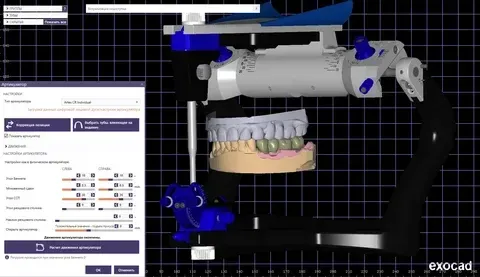
Technician designing a digital wax-up in CAD, proposed restorations on screen against the occlusion

Overview

Digital Wax-Ups for Clinical Workflows

A digital wax-up is where the restorative plan takes shape. Proposed form, length, proportion and occlusion are designed in CAD, so the case is decided before a bur touches enamel.

The diagnostic wax-up has always been the plan behind an esthetic or rehabilitation case. Doing it digitally makes it faster to revise, easy to duplicate, and directly printable — the same file drives a model, a matrix, an intraoral mockup and, ultimately, the final restorations.

  • Not every case needs one: For a simple single posterior unit it is usually unnecessary — where a case is straightforward, we will say so.

  • One continuous record: The wax-up carries forward into the provisional and the final, so the plan you approved is what gets made.
Learn more
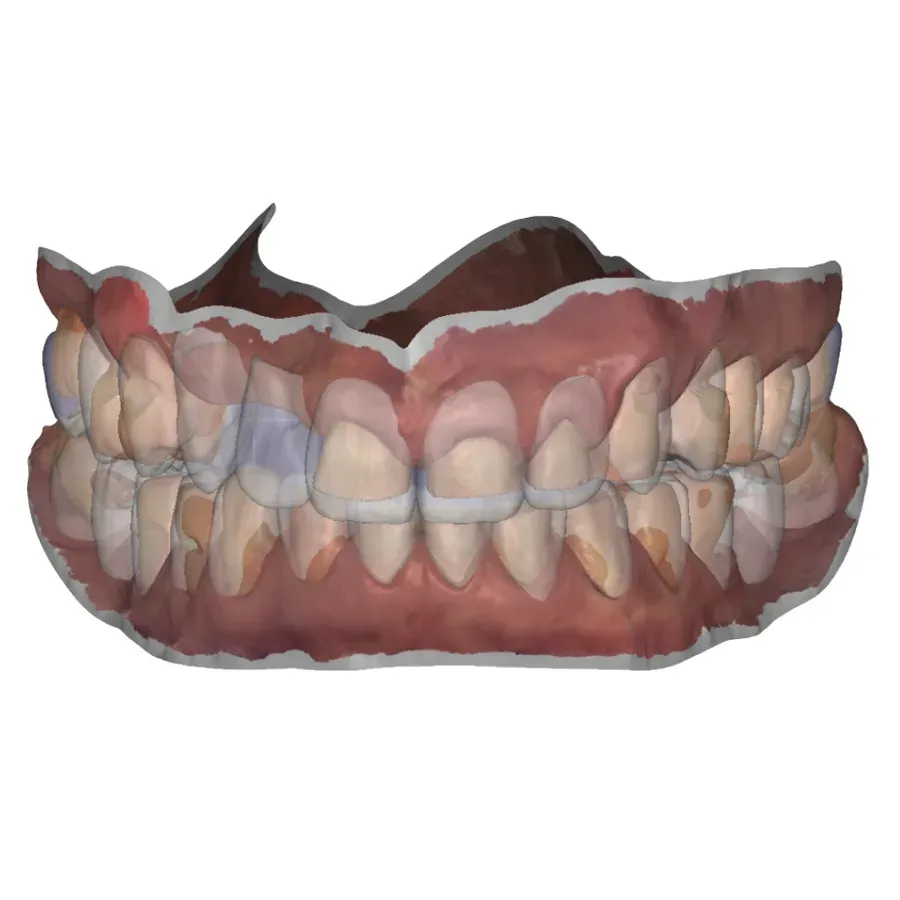
Digital wax-up design showing planned reduction depth over the unprepped teeth

Blueprint First

See the Result Before You Prep

Designing the restorations up front turns the wax-up into a test of the plan. Clearance, occlusion, edge position and midline are all visible before the prep, so the reduction you cut serves a decided outcome instead of a hopeful one.

  • Reduction made visible: The blueprint shows how much reduction the plan actually needs, before you commit to a depth.

  • Exports to production: Printed model, matrix or mockup — the same file drives whatever the case needs next.

Learn more
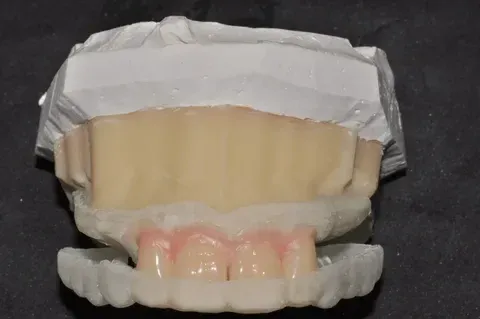
Printed matrix loaded with provisional material seated for an intraoral mockup

Into the Mouth

From Wax-Up to Mockup and Provisional

Because the wax-up is a digital file, it exports cleanly to a printed model or a matrix for an intraoral mockup — so the patient and you can see and test the plan chairside before any irreversible work.

The same design carries into accurate provisionals and, once approved, into the final restorative design, keeping one continuous plan across the case.

  • Tested chairside: The patient and you see and test the plan before any irreversible work.

  • One design, start to seating: The approved wax-up is the reference for the mockup, provisional and definitive restorations.

Learn more

Case Types

What a Digital Wax-Up Is For

Anywhere the restorative result should be planned and previewed before the case is committed.

Anterior Esthetic Planning

Design proposed form, length and proportion for veneer and anterior crown cases before the prep is cut.

Full-Mouth Rehabilitation

Map the restorative scheme across the arch, including cases that open vertical dimension, so every unit agrees.

Implant & Full-Arch Cases

A prosthetic target the implant plan and provisional can be built to, rather than reverse-engineered later.

Mockup & Provisional Source

A wax-up that exports to a printed model or matrix for an intraoral mockup and accurate provisionals.

Reduction & Prep Guidance

A blueprint that shows how much reduction the plan actually needs, before you commit to a depth.

Case Communication

A concrete restorative preview for the patient conversation and for aligning the whole treatment team.

Method Selection

When a Digital Wax-Up Earns Its Place

  • Anterior esthetic and veneer cases
  • Full-mouth rehabilitation, including opened vertical dimension
  • Implant and full-arch cases that need a prosthetic target
  • A source for printed mockups and accurate provisionals
  • Reduction and prep guidance before you cut
  • Case communication with the patient and the treatment team

For a simple single posterior unit a wax-up is usually unnecessary — where a case is straightforward, we will say so.

Advantages

Why Wax Up Digitally

  • Plan Before You Prep

    Form, length, proportion and occlusion are worked out digitally, so the prep serves a decided plan instead of a guess.

  • Printable & Reusable

    The digital wax-up exports to a model, a matrix or a mockup, and the saved file can be duplicated or revised at any time.

  • Fewer Surprises

    Seeing the restorative result in advance surfaces the problems — clearance, occlusion, midline — while they are still easy to fix.

  • One Continuous Record

    The wax-up carries forward into the provisional and the final, so the plan you approved is what gets made.

Where a wax-up earns its place

It earns its place wherever the result needs to be seen before it is built: anterior esthetics, full-mouth rehabilitation, cases that open vertical dimension, and implant or full-arch work that needs a prosthetic target.

Design & Quality

Design, Occlusion, and Quality Control

Designed to the Occlusion

A wax-up that ignores the bite is just a picture. We design proposed restorations against the articulated occlusion — and, for anterior cases, the facial reference or an existing smile design — so the plan is functional as well as esthetic.

Read the full design process Show less

Review and Communication

You approve or adjust the wax-up before it goes anywhere. Where the design reveals a conflict — too little clearance, an occlusal interference, an unrealistic edge position — we raise it with you rather than paper over it.

Continuity Into the Final

The approved wax-up is the reference for the mockup, the provisional and the definitive restorations, so the intent is preserved from the first design through to seating.

Case Submission

What to Send With a Digital Wax-Up Case

A clean scan, an accurate bite and a clear brief are most of the job.

Required records:

  • STL scans of both arches
  • Bite registration
  • Photographs for esthetic cases
  • Notes on the intended changes — length, form, midline, vertical dimension

Helpful extras: an existing smile design, references for shape or shade, and the target occlusal scheme for rehabilitation cases. A distorted full-arch scan or a missing bite is the usual cause of a stalled wax-up — flag anything unusual and we will confirm before designing. New to the lab? Open an account to begin.

Why Universal Dental Lab

Why Clinics Choose Us for Wax-Ups

  • Plan Before You Prep

    Clearance, occlusal length, and space for the definitive restoration show up in the wax-up — we flag conflicts while the case is still in planning.

  • Saved Blueprint, Not a One-Off

    The digital wax-up lives as a file with occlusion checked in, so a revision or a second arch does not restart from scratch.

  • Mockup to Final From One File

    The approved wax-up exports to a matrix, a printed mockup, or the restorative CAD without a redesign handoff.

Start a case

Send one case. Keep the scanner.

Open a partner account and your first case moves with a shade record and our remake guarantee — if a unit does not seat, we redo it at no charge.

  • Free 3Shape TRIOS 6 scanner for active partners
  • Under-2% remake rate — remakes at no charge
  • One named technician you reach directly — no call center

Prefer to talk? +1 747-268-0808

No call center — you hear back from the lab, not a bot.

Digital Wax-Up FAQ

Digital Wax-Ups — Questions Dentists Ask

Tooth length and proportion, midline, occlusal contacts, and whether you have enough clearance for the material you intend to use. On rehab cases it also tests vertical dimension changes and anterior guidance before enamel is removed. The wax-up is the cheap place to find conflicts — not at try-in.

Yes. We share a design proof for review and revision before anything is printed or milled. Esthetic cases usually need at least one revision round; posterior-only wax-ups for occlusal planning may approve faster when the goal is functional rather than cosmetic.

A VDO change needs both arches articulated to the new vertical, posterior support confirmed, and guidance checked — not just longer anteriors on screen. Esthetic-only wax-ups stay in the existing occlusal scheme. Tell us which you are planning so the design does not fight the bite you will keep.

How to send a file

The approved STL becomes the master contour: printed models for matrix mockups, milled or printed provisionals, and the reference our ceramists or mill path follow for definitive work. One approved wax-up keeps the anterior sequence aligned instead of redesigning at each stage.

A single central with minimal shape change and a clear shade match may not need a printable wax-up — though a quick design check still helps on discolored stumps or tight clearance. Multi-unit smiles, length changes, or any case where the patient needs to see the plan before prep should run through wax-up and usually a mockup.

Smile preview mockups

Partner Offer

A Free Intraoral Scanner for Partner Practices

Partner with Universal Dental Lab and we place a 3Shape TRIOS 6 Wireless in your operatory — free for the length of our partnership. Scan the prep, send it in seconds, and skip impressions entirely.